AI Tools vs AI Employees: A Business Guide
AI for Business, Business Automation, Baton Rouge
What’s the Difference Between an AI Tool and an AI Employee?
If you’re a Baton Rouge business owner, you’ve probably heard phrases like “AI tool,” “AI assistant,” and “AI employee” thrown around in every sales pitch. No wonder it feels confusing. Let’s clear this up in plain language so you can decide what actually makes sense for your operation.

AI Tool vs AI Employee: The Simple Definition
Here’s the cleanest way to think about it when you hear AI tool vs AI employee:
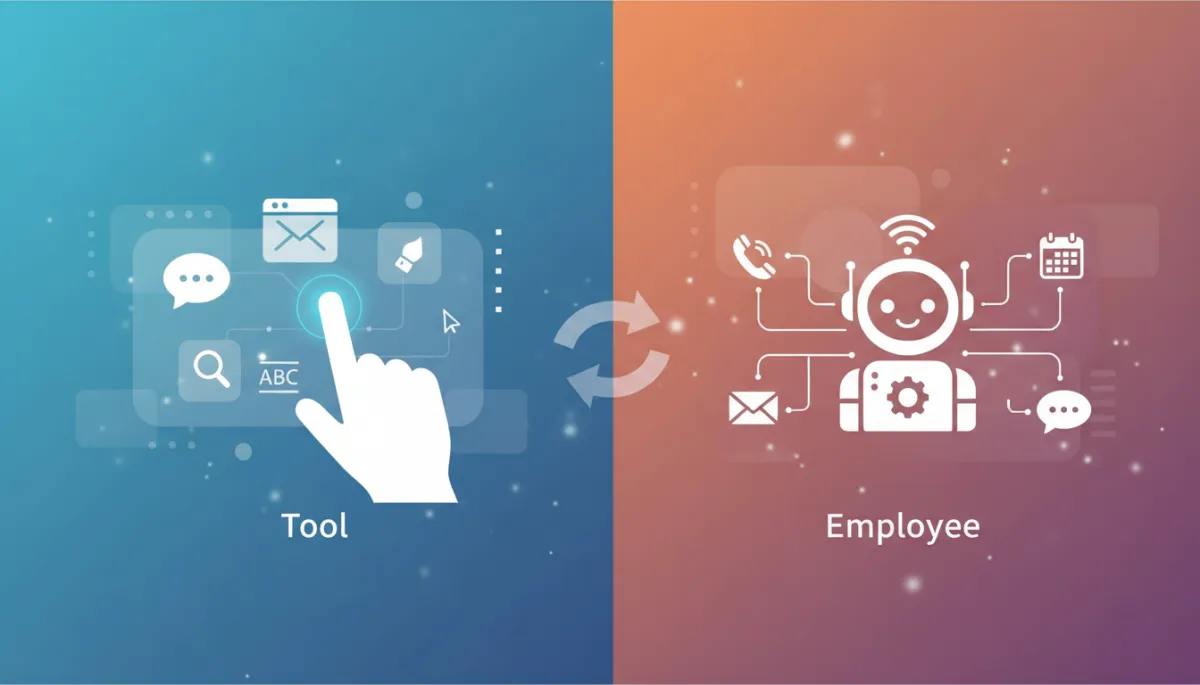
- An AI tool is a feature inside software that helps a person do their job faster or better. It assists a human.
- An AI employee is a purpose-built system that handles a specific job from start to finish. It replaces a clearly defined role or set of tasks.
The key difference is scope. Tools support people. AI employees take full ownership of a process in your business. Once you understand that, the rest of the AI for business conversation gets much easier to navigate.
Everyday Examples of AI Tools You Already Know
You’re probably using AI tools already, even if you don’t call them that. They’re usually small features built into software you recognize. For Baton Rouge businesses, common AI tools include:
- Spell-check and grammar suggestions in email or word processors. They don’t send the email for you; they just clean it up.
- Auto-suggest in text or email that finishes your sentences, like “Thanks for reaching out…” You still decide what gets sent.
- Image generation inside design tools, where you type a description and it creates a graphic you can use in a flyer or social post.
- Search and recommendation features in CRM or booking software that suggest the “next best action” or highlight hot leads.
- A chatbot inside a platform that helps your staff find answers faster but doesn’t talk to your customers directly.
These AI tools are helpers. They save time, reduce mistakes, and make your team more efficient. But they never truly “own” a business function. A human is still in charge of the outcome.
What an AI Employee Looks Like in a Local Business
Now let’s talk about AI employees. This is where business automation really starts to feel like adding staff without adding payroll. An AI employee is built to handle a complete role, end-to-end, with clear rules and outcomes.
- An AI receptionist that answers every call, greets the caller, routes calls, books appointments, and sends confirmations—24/7, no voicemail backlog.
- An AI system that qualifies leads from your website, Facebook ads, or Google campaigns, asks the right questions, and only passes serious prospects to your sales team.
- An AI that manages customer messages across text, email, and chat—answering FAQs, sending directions, rescheduling appointments, and updating your calendar automatically.
- An AI-driven appointment flow manager that handles reminders, follow-ups, no-show recovery messages, and review requests without your staff touching a thing.
These are not just “features.” They are systems that behave like reliable team members. Platforms like ReignMakerAI specialize in this kind of AI employee implementation, especially for service businesses that live and die by calls, appointments, and follow-ups.
How to Decide Which One You Actually Need
When Baton Rouge owners ask me about AI for business, I walk them through one simple question:
If your answer is “I just want this to be faster or cleaner,” you’re looking for an AI tool. For example:
- Your office manager writes all your customer emails, but they take too long. AI writing and grammar tools can speed that up without changing who’s responsible.
- Your marketing person designs social posts and flyers. AI image tools can help them create more content, faster, while they still control the message.
If your answer is “I’m tired of this role constantly being dropped, missed, or understaffed,” you’re probably ready for an AI employee. For example:
- You’re losing money to missed calls and slow responses. An AI receptionist or AI lead-qualifier can capture and nurture every opportunity automatically.
- Your team is constantly behind on reminders, follow-ups, and review requests. An AI employee can own that entire communication flow, end-to-end.
Getting Practical About AI in Your Baton Rouge Business
Vendors often blur the line between AI tools and AI employees because “AI-powered” sounds impressive in a demo. As a local business technology advisor, my job is to strip away the hype and focus on results:
- If you want to sharpen what your existing team already does well, look for targeted AI tools inside the software you use today.
- If you want to reliably hand off phones, messages, or appointment flows, evaluate a true AI employee solution, such as those built with ReignMakerAI.
Both approaches can be powerful. The real win comes from matching the right kind of AI to the right problem in your business, instead of buying whatever the loudest vendor is pushing this month.
Not sure whether you need an AI tool or an AI employee for your operation? Reach out to Kurt Howard, Local Business Technology Advisor, serving Baton Rouge.